ACX Audio Submission Requirements: Every Spec, and How to Pass
Alek Karp
Co-founder
Share this article
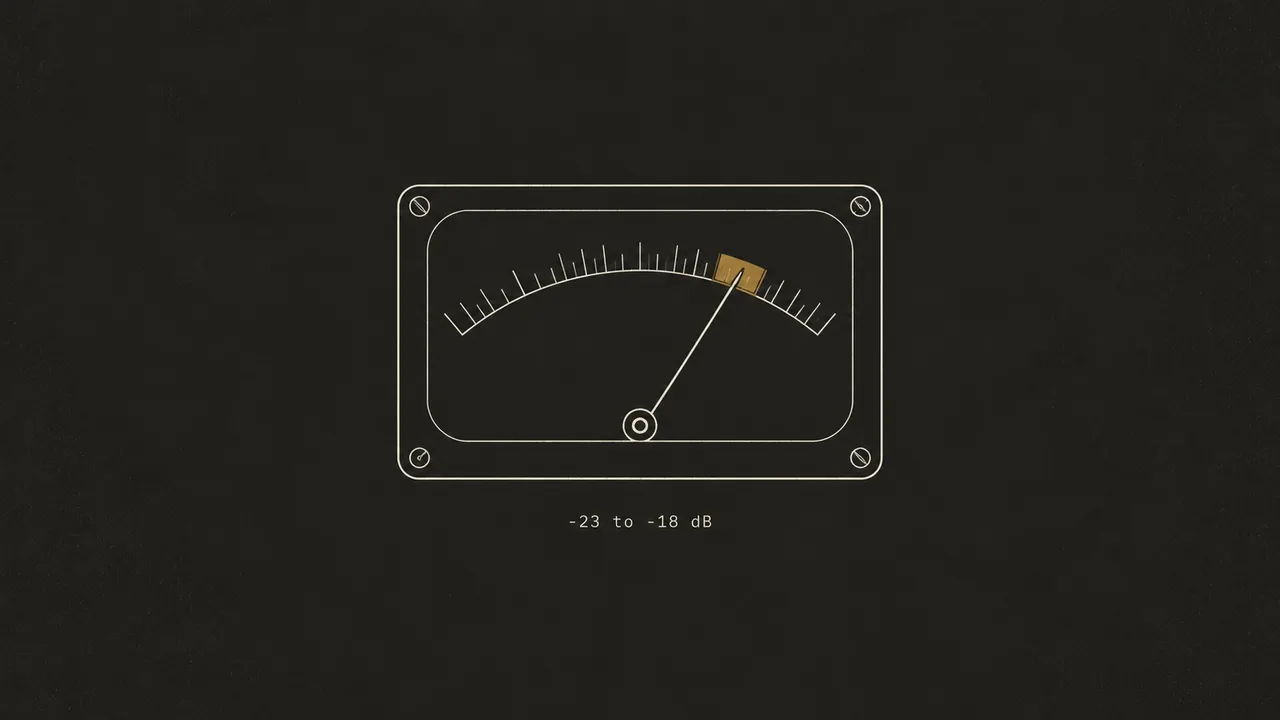
ACX audio submission requirements in one checklist: RMS, peak, and noise floor limits, MP3 bitrate, file structure, room tone, credits, and sample.
ACX gates every audiobook on a short list of numbers. RMS sits between -23 dB and -18 dB, peaks stay at or below -3 dB, and the noise floor stays at -60 dB or lower.
Files ship as constant bit rate MP3 at 192 kbps or higher and 44.1 kHz, one chapter per file, 120 minutes max. Miss one number and the book comes back.
What are the ACX audio submission requirements?
ACX audio submission requirements set RMS at -23 to -18 dB, peaks at -3 dB max, and the noise floor at -60 dB max. Files are 192 kbps or higher constant bit rate MP3 at 44.1 kHz, all mono or all stereo, one chapter per file, 120 minutes max. Each file carries 1–5 seconds of room tone at the head and at the tail, with separate credit files and a retail sample of five minutes or less.
Here is the full checklist in one table, built from ACX's published requirements. The right column lists the mistakes that usually trip each line.
| Requirement | ACX spec | What fails it |
|---|---|---|
| RMS loudness | -23 dB to -18 dB | Quiet recordings boosted late; chapters left unnormalized |
| Peak level | -3 dB max | Plosives and shouts; normalizing to 0 dB |
| Noise floor | -60 dB max | Fan or AC hum, gain added after recording |
| File format | 192 kbps or higher CBR MP3 at 44.1 kHz | Variable bit rate exports; 48 kHz session files |
| Channels | All mono or all stereo (mono recommended) | Mono chapters mixed with stereo credits |
| File structure | One chapter or section per file, header read aloud | Two chapters in one file; chapter titles skipped |
| File length | 120 minutes max per file | Long nonfiction chapters left unsplit |
| Room tone | 1–5 s at the head and at the tail | Files trimmed tight to the first and last word |
| Clean audio | Free of plosives, mouth noise, clicks, and outtakes | Missed retakes, lip smacks, mouse clicks, chair creaks |
| Opening credits | Title, author, and narrator in their own file | Credits merged into chapter one |
| Closing credits | "The end" at minimum, in its own file | Book ends with no closing file |
| Retail sample | Five minutes or less | Copyright page as the sample; running past five minutes |
| Consistency | Same sound across every file | Different rooms or gain settings between sessions |
Treat the table as a pass/fail sheet. ACX standards are binary at upload, so a file that is almost right still comes back.
Every number on that list has a job. The -3 dB peak ceiling keeps loud moments clear of distortion. The RMS window keeps a listener from reaching for the volume every time a new chapter starts.
The ACX structure rules exist for navigation. One chapter per file, with the header read aloud, lets a listener skip to chapter twelve and know they landed there. The clean-audio and consistency rules cover what a meter misses, and those are the flaws a listener hears first.
The stakes are real money. The Audio Publishers Association's APA annual audiobook survey put US audiobook sales revenue at "$2.43 billion in 2025, 9% over the previous year." Every rejected upload is time your book sits off the shelf in that market.
One catch spec guides tend to skip: ACX self-serve still expects human narration and does not accept externally produced AI narration. Our store-by-store AI narration guide covers that rule and maps where AI-narrated audiobooks can sell instead. A perfectly mastered AI read has no path through that upload.
How do the loudness specs work?
Three numbers, one file. RMS, peak, and noise floor move together, so adding gain to raise RMS raises the peaks and the noise floor by the same amount.
That is why the order of work matters. Fix noise at the microphone, and set loudness last, after the peaks are under control.
What does -23 dB to -18 dB RMS mean?
RMS (root mean square) is the average loudness of a file across its whole length. Below -23 dB the file is too quiet. Above -18 dB it is too hot, and long listening gets tiring.
The trap is recording too quietly and fixing it later. Set your input so speaking peaks land roughly between -18 dB and -12 dB on the meter. That way you are not adding 20 dB of gain in the edit.
Here is the math. A chapter recorded at -40 dB RMS needs 22 dB of gain to reach -18 dB. That same 22 dB lifts a -70 dB noise floor to -48 dB, which fails the -60 dB limit by 12 dB.
This is why the "just normalize it" advice in older forum threads fails so often. Normalizing raises everything, including the hiss you could not hear at -70 dB.
RMS is read per file, so each chapter has to land in range on its own. A quiet chapter does not average out against a loud one, and a 40-second credit file gets measured like a 40-minute chapter.
The opposite problem is rarer and easier. A file above -18 dB RMS needs gain taken away, which lowers the noise floor along with it. The risk there is a heavy limiter used earlier in the chain, which flattens the performance until every line sounds equally loud.
Formal loudness measurement has its own standards, and they are easy to confuse with ACX's numbers. The International Telecommunication Union's ITU-R BS.1770 loudness standard specifies "audio measurement algorithms for the purpose of determining subjective programme loudness, and true-peak signal level." It defines how to measure loudness and sets no audiobook target.
The European Broadcasting Union's EBU R128 loudness recommendation sets a broadcast "Target Level of −23.0 LUFS," and true peak "shall not exceed −1 dBTP." That -23 matches ACX's lower RMS bound in digits alone. LUFS is a gated, whole-programme broadcast measure while ACX specifies RMS, so a file at -23 LUFS is not automatically inside ACX's window.
Why does ACX cap peaks at -3 dB?
Peak is the loudest single moment in a file. At 0 dB the signal clips, and digital clipping is permanent distortion you cannot edit out.
ACX's -3 dB ceiling leaves headroom below clipping.
The working order is limit, then normalize. A limiter shaves the loudest moments, which opens room to raise the whole file. That lifts RMS into range without breaking the ceiling.
Limit gently. Taking 4–5 dB off the loudest peaks is usually inaudible. At 10 dB, laughs and shouts start to sound squashed.
Most stray peaks in narration come from hard consonants and sudden laughs. A pop filter and a slight off-axis angle on the mic stop many of them before a limiter ever has to.
How do you hit a -60 dB noise floor at home?
Noise floor is the sound of your room when no one is talking: hum, hiss, traffic, the neighbor's dog. ACX caps it at -60 dB, and you win that number at the microphone.
Heavy noise reduction in the edit is the tempting shortcut. It thins the voice and adds a watery, metallic texture. Human QA flags that texture even when the meter passes.
Start with the room. A small, soft space beats a large, bare one, which is why a clothes closet full of hanging clothes is the classic home booth. Hang blankets behind the mic to soak up reflections off the wall you face.
Then remove the sources. Switch off fans and AC for every take. Record in the same room at the same time of day each session, so the room tone and traffic noise match from chapter to chapter.
None of this needs a budget. A closet and two moving blankets will move the noise floor further than any plug-in.
Mic choice depends on the room. A dynamic mic picks up less of the space around it and suits an untreated room. A condenser hears everything, so use one only in a dead room.
Our recording brief for home studios walks through the same setup we give authors recording their own voice. Run a 30-second test of silence before each session and measure it, so you know the floor before you read a line.
What file format does ACX require?
ACX requires MP3 at 192 kbps or higher, constant bit rate, 44.1 kHz. Variable bit rate exports fail the spec even when the average bitrate clears 192.
Record and edit in WAV, and export MP3 only as the last step. MP3 is lossy, so each re-encode throws away more of the signal. Editing an MP3 and exporting it again stacks that loss.
The Library of Congress MP3 description puts a 128 kbit/s MP3 at "about 1/11 the size" of uncompressed audio at CD quality (44.1 kHz, 16-bit). That size saving is the trade. ACX's 192 kbps floor keeps compression gentler than 128 kbps, and 44.1 kHz matches the CD reference rate.
Pick mono or stereo and use it for every file, credits and sample included. ACX recommends mono for narration, since a single voice gains nothing from two identical channels.
Set the export dialog by hand rather than trusting a preset. Choose MP3, constant bit rate, 192 kbps or higher, 44.1 kHz, and the channel count you picked. Save that as a named preset so every chapter uses identical ACX specs.
Watch the session rate too. If your session runs at 48 kHz, convert on export. A 48 kHz chapter fails on upload even if it sounds perfect.
Lex delivers chapter downloads at 320 kbps, well above the floor. Our page on audiobook file specs stores check covers what each store looks for on upload, beyond ACX.
How should chapters, credits, and the sample be packaged?
ACX checks the shape of the book as well as the sound. A perfectly mastered chapter still bounces if it sits in the wrong file or starts without room tone.
Packaging is also where small files get forgotten. Credits and samples go through the same review as chapter one, so they get the same care.
Chapter files and room tone
Each chapter or section gets its own file, with the header read aloud as written. If the manuscript says "Chapter Seven: The Crossing," the narrator says exactly that, so listeners know where they are.
Number the files in reading order, starting with the opening credits, so the upload order matches the book. A clear name per file saves a round of confusion if a single chapter bounces.
Files max out at 120 minutes. A long nonfiction chapter needs a split at a natural break, with each part in its own file.
Room tone goes at both ends: 1–5 seconds at the head and 1–5 seconds at the tail, per ACX audio submission requirements updated April 2026. Pick one value for each and use it on every file.
Room tone means the recorded sound of your room, cut from the same session. Digital silence (a flat line) sounds like a dropout next to the voice, and it makes the cut between files obvious.
Then listen through for what the meter cannot catch. Plosives, mic pops, mouth noise, mouse clicks, and outtakes all have to go before upload. A retake left in the file, with you reading the same sentence twice, is the one reviewers notice fastest.
Opening credits, closing credits, and the retail sample
Opening credits are their own file: the title, the author, and the narrator, read aloud. Closing credits are a separate file too, and at minimum they say "The end."
Credits get the same mastering as chapters. Short files are easy to skip in the final check, so measure them like chapters.
The retail sample runs five minutes or less. Choose a mid-scene passage with energy, never the copyright page, and end on a complete sentence.
Pull the sample from your mastered chapter files. That way it matches the book's loudness and passes the same ACX guidelines as everything else.
The sample is the first thing a buyer hears, so it sells the book or loses the sale. A scene with dialogue or a turn in the plot does more work than a slow opening description.
Five minutes is a hard ceiling for the ACX sample.
How do you check ACX compliance before uploading?
Measure every file before upload, credits and sample included. Adobe Audition and Audacity both give you the numbers the ACX audio requirements check.
In Adobe Audition, open Amplitude Statistics and read Total RMS and peak. Normalize to -3 dB first. If RMS is still below -23 dB, limit the peaks 4–5 dB with the Dynamics Processor, then normalize again and re-measure.
Audition's Match Loudness panel is the alternate route. Use Match Loudness with a true-peak limit set below -3 dB. Then re-measure with Amplitude Statistics, since ACX reads RMS.
In Audacity, the ACX Check plug-in reports RMS, peak, and noise floor in one pass. Run it on every file, because a pass on chapter one says nothing about chapter twenty.
Measure the noise floor on a stretch of room tone only, with no breaths or words in the selection. A reading taken over speech tells you nothing about the floor.
Consistency is the check no plug-in runs for you. Keep a log of preamp gain, mic distance and angle, and the plugin chain. Apply that log identically to every chapter and credit file.
Then listen on two systems, closed-back headphones and a pair of cheap earbuds. Mouth clicks can hide on studio headphones and jump out on earbuds.
Keep the original WAVs. If a file bounces, you re-master from the source instead of re-encoding an MP3 that has already lost detail.
A pre-upload pass, in order:
- Measure RMS, peak, and noise floor on every file, credits and sample included.
- Confirm 192 kbps or higher CBR MP3 at 44.1 kHz, all mono or all stereo.
- Check head and tail room tone on every file against your chosen values.
- Confirm each file runs under 120 minutes and the sample under five minutes.
- Listen through for clicks, plosives, mouth noise, and outtakes the meter cannot hear.
- Compare a minute of chapter one against a minute of the last chapter for matching sound.
FAQ
Quick answers on ACX specs, gear, and timing, plus where AI narration fits. The sections above carry the detail.
What is the difference between RMS and peak levels for ACX?
RMS is the average loudness across a file and must sit between -23 dB and -18 dB. Peak is the single loudest instant and must not go above -3 dB.
Should I record audiobooks in mono or stereo for ACX?
ACX recommends mono for narration. Whichever you choose, every file, including credits and the sample, must match.
What equipment do I need to record for ACX?
You need an XLR mic into an audio interface, closed-back headphones, and a DAW such as Audacity or Reaper (Adobe Audition works too).
How long does ACX approval take?
Each retailer reviews on its own timeline, and no single approval window is guaranteed. Build buffer into your launch date instead of planning around a fixed number.
What are the ACX cover art requirements?
The Lex cover checklist calls for a square 2400 × 2400 JPG with no borders and no text hugging the edges.
Can I submit an AI-narrated audiobook through ACX?
No. ACX self-serve still expects human narration and does not accept externally produced AI narration. Lex Publisher goes to Audible as a direct Lex upload under Lex's publisher agreement, as part of our done-for-you audiobook distribution.
Conclusion
Passing ACX comes down to order and discipline. Record clean at healthy levels, measure every file before you master, and keep every chapter and credit file sounding like one session.
From there the decision is yours. Run the checklist yourself if you have a quiet room and patience for logging. Otherwise, have files mastered to spec and spend that time writing.
Either way, weigh what you keep. Our ACX royalty share math runs royalty share against a one-time fee.
Lex production pricing starts at $49 for ten finished hours, and you own the master.
Hear your first chapter free
Send the manuscript. We cast, direct, and score the opening and send it back in about a day. No card, yours to keep.
More to read
How to Market an Audiobook: A Producer's Launch Plan for Indie Authors
How to market an audiobook in order: fix the listing, choose your shelves, tell your readers, post clips, collect reviews, and pay for reach last.
Audiobook Pronunciation Guide for Narrators: What to Include and How to Write It
How to write an audiobook pronunciation guide for narrators: what to list, respellings that read at speed, and how to check the audio.